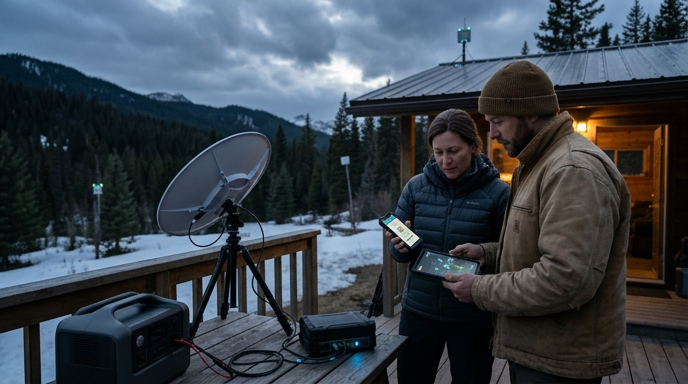
Bitcoin satellite and mesh networks Canada 2026: How to transact during internet and power outages
Bitcoin satellite and mesh networks Canada 2026 is a practical how-to for Canadians who want resilient Bitcoin access during internet outages, regional blackouts, or emergency scenarios. This guide explains how to receive the Bitcoin blockchain by satellite, options for two-way connectivity (Starlink, mesh, mobile), low-bandwidth broadcast strategies, and how to safely sign and broadcast transactions when conventional internet is unavailable. If you need operational continuity for self-custody, Lightning, or running a full node during outages, this article gives step-by-step preparation, equipment checklists, legal considerations for Canada, and tested workflows to keep your BTC accessible and secure.
Table of Contents
- Why plan for satellite and mesh connectivity?
- Core approaches at a glance
- How each technology helps - quick comparison
- Essential equipment checklist
- Step-by-step: Prepare your resilient Bitcoin setup
- Detailed workflow examples
- A. One-person, short outage (mobile data fails) - quick path
- B. Prolonged outage in a community - mesh + satellite receive
- Security and legal considerations in Canada
- Power planning – how much capacity do you need?
- Operational tips and best practices
- When to hold transactions versus broadcast immediately
- Troubleshooting checklist
- FAQ
- 1. Can I both receive and broadcast via Blockstream Satellite?
- 2. Is using Starlink legal in Canada for Bitcoin continuity?
- 3. Can I use amateur radio to broadcast transactions?
- 4. What if I only have a hardware wallet and no node?
- 5. Does the CRA care how I connect to the network during an outage?
- Conclusion - actionable takeaways
Why plan for satellite and mesh connectivity?
Modern Bitcoin custody depends on network reachability in at least two ways: a) keeping a local full node synced and b) broadcasting transactions (on-chain or Lightning). In Canada, wildfires, winter storms, grid failures, and targeted outages can interrupt wired and cellular networks. Preparing with satellite reception, alternate two-way links, and portable power reduces operational risk and preserves self-custody capabilities during prolonged outages. The goal is availability without sacrificing security or privacy.
Core approaches at a glance
- Receive blockchain data one-way by satellite - keep a node synced even without internet.
- Use satellite internet (Starlink) or cellular backup for two-way connectivity to broadcast transactions.
- Leverage community mesh networks or LoRa radio for local, low-bandwidth broadcasts.
- Prepare air-gapped signing workflows (PSBT) so you can create signed transactions offline and broadcast when connectivity is available.
- Design portable power solutions (UPS, battery, solar) sized to run your node and comms hardware.
How each technology helps - quick comparison
| Option | Two-way? | Bandwidth | Cost / availability in Canada | Best use |
|---|---|---|---|---|
| Blockstream Satellite (receive only) | No | High for blockchain download (one-way) | Low-cost reception hardware; service free to receive | Keep a full node synced without internet |
| Starlink / satellite ISP | Yes | High | Monthly fee; good coverage in many parts of Canada | Full two-way internet for broadcasting |
| Cellular (mobile data) | Yes | Medium-high | Depends on carrier; may fail during outages | Primary short-term connectivity |
| Mesh Wi-Fi / community mesh | Sometimes (if connected gateways) | Low–medium | Low cost; community dependent | Local transaction broadcasting and messaging |
| LoRa / HF radio | Possible (very low bandwidth) | Very low | Low hardware cost; licensing may apply for some frequencies | Broadcasting small payloads such as raw hex or PSBT fragments |
Essential equipment checklist
- Portable full node hardware: Raspberry Pi 4/8GB or small x86 mini-PC with SSD.
- External power: high-capacity UPS or battery pack (12 V / 1000 Wh+ recommended) and a solar charging option if prolonged outages are possible.
- Blockstream Satellite kit or DIY satellite LNB and USB SDR with compatible software for receiving blockchain data.
- Two-way fallback: Starlink kit or a secondary cellular hotspot with multi-carrier SIMs.
- Hardware wallet(s) for signing (make sure they are charged and updated).
- Air-gapped signing kit: an offline device that can generate or sign PSBTs and transfer via QR, microSD, or USB stick.
- Low-bandwidth radio/LoRa node if you plan to broadcast using local radio links (check licensing rules).
- Ethernet and USB cables, small rugged case, and basic tools for deployment.
Step-by-step: Prepare your resilient Bitcoin setup
-
Run and sync a full node with satellite as a backup receiver.
Configure a full node that can accept a one-way blockchain feed from Blockstream Satellite. This keeps your node validated and reduces dependency on third-party block explorers. See our guide on how to run a Bitcoin full node for hardware and software recommendations tailored to Canada.
-
Set up an air-gapped signing workflow.
When internet is unavailable, create unsigned PSBTs on a connected device, transfer to an offline signer, and produce a signed PSBT. Our PSBT cold signing guide explains the secure workflow and tools required: PSBT cold signing and air-gapped workflows.
-
Choose your broadcast path.
Preferred order: 1) Starlink or satellite ISP if available, 2) cellular hotspot with multiple carriers, 3) community mesh gateway, 4) low-bandwidth radio or trusted relay. Design fallback sequences and test each path before you need it.
-
Prepare Lightning fallback and watchtowers.
Lightning channels require periodic connectivity and dispute protection. Configure remote watchtowers or run your own watchtower to protect channels if you go offline. For operational details and how watchtowers assist offline security, see our guide on Lightning watchtowers and offline security.
-
Practice and document.
Run drills where you generate, sign, and broadcast a small-value transaction using each fallback. Maintain documented, simple step-by-step instructions so family members or delegates can act during an emergency.
Detailed workflow examples
A. One-person, short outage (mobile data fails) - quick path
- Switch phone to external carrier SIM or activate portable multi-carrier hotspot.
- Connect your mobile wallet or node to the hotspot and broadcast the signed transaction.
- If mobile is unavailable, create a PSBT on a connected device and transfer to an offline signer; hold until you can reconnect.
B. Prolonged outage in a community - mesh + satellite receive
- Keep the full node synced via Blockstream Satellite to validate balances and UTXO set locally.
- Use community mesh gateways to reach a node with upstream connectivity for broadcasting small, time-sensitive transactions.
- If no gateway exists, plan a secure physical handoff or use low-bandwidth radio to a trusted relay to broadcast a signed hex or PSBT fragment.
Security and legal considerations in Canada
- Blockstream Satellite is receive-only and does not replace two-way internet for broadcasting. Use it primarily to keep a node validated and reduce reliance on third-party block explorers.
- Satellite internet providers like Starlink provide two-way connectivity but require subscription and may be subject to export or regulatory restrictions. Confirm terms and availability in your province or territory.
- Using amateur radio or certain HF bands to transmit transaction data may require an amateur radio license and must comply with Industry Canada rules. Do not transmit encrypted or commercial traffic on amateur bands where prohibited.
- Ensure signed PSBTs are transferred using trusted methods (QR, microSD) and avoid exposing private keys or seed phrases when using community relays or third parties.
- CRA cares about accurate recordkeeping and reporting, not how you connected to the network. Maintain logs and signed transaction records for auditing and tax purposes.
Power planning – how much capacity do you need?
Estimate based on device power draw and desired runtime. Example loads:
- Raspberry Pi 4 + SSD: 10-15 W average
- Starlink terminal: 40-60 W peak
- Cellular hotspot: 5-15 W
- Small router: 5-10 W
To run a Raspberry Pi node for 48 hours at 15 W you need approximately 720 Wh. Add Starlink and other devices if you plan to run two-way connectivity. Use an inverter and a charged battery bank or UPS sized for your expected outage duration, and consider portable solar recharging for multi-day resilience.
Operational tips and best practices
- Keep hardware and firmware updated in normal times so emergency deploys are less likely to fail.
- Label and document each component and step. Emergency procedures should be clear enough for a trusted third party to follow.
- Use low-value test transactions when rehearsing broadcast paths. Confirm full settlement by checking your local node or validated sources.
- Maintain cold backups of seed phrases in secure, geographically separated locations. Do not rely on a single physical site that could be affected by regional outages.
- For businesses or family custody, add redundancy by combining multisig, watchtowers, and multiple broadcast paths with documented keys and recovery processes. See our guide on building a resilient emergency fund and custody strategy for more context: building a Bitcoin emergency fund.
When to hold transactions versus broadcast immediately
If an outage is short and you can use a secure two-way path, broadcast immediately. For longer outages or high-value transactions, prefer the following conservative approach:
- Generate the unsigned transaction and create a PSBT.
- Sign on an offline hardware wallet and verify signatures locally.
- Attempt to broadcast via the most secure available path. If that path is untrusted or requires third-party handling, consider waiting for a secure connection (satellite ISP or trusted relay) unless timeliness is critical.
Troubleshooting checklist
- Node not syncing from satellite: verify antenna alignment, LNB, and software logs for packet loss.
- Signed PSBT won’t broadcast: verify hex integrity on a separate system before attempting rebroadcast; confirm fee rate is sufficient for current mempool conditions.
- Lightning channel issues while offline: ensure watchtower commitments are up-to-date and review channel state recovery procedures.
FAQ
1. Can I both receive and broadcast via Blockstream Satellite?
Blockstream Satellite is primarily a one-way broadcast service for the Bitcoin blockchain. It helps keep a full node synced without internet, but it does not provide a direct two-way channel to broadcast transactions. Broadcasting requires an uplink such as Starlink, cellular, a community gateway, or a trusted relay.
2. Is using Starlink legal in Canada for Bitcoin continuity?
Yes, Starlink is a commercially available satellite internet service in Canada and can be used for normal internet and Bitcoin broadcasting. Check local availability, billing, and any export or regulatory notices before purchase.
3. Can I use amateur radio to broadcast transactions?
Technically possible for very low-bandwidth data, but transmissions on amateur bands are subject to licensing and content restrictions. Never transmit encrypted commercial traffic or violate Industry Canada regulations. Seek proper licensing and legal advice before using radio for broadcast.
4. What if I only have a hardware wallet and no node?
A hardware wallet can sign transactions offline, but you still need a way to construct unsigned PSBTs and broadcast them. Consider pairing your hardware wallet with a portable node or a trustworthy relay. Running a receiving-only full node via satellite gives you independent verification of your balances even if you rely on third parties to broadcast.
5. Does the CRA care how I connect to the network during an outage?
CRA concerns focus on accurate tax reporting and recordkeeping, not on connectivity methods. Keep transaction logs, timestamps, and supporting documentation for your tax records regardless of how you broadcast transactions.
Conclusion - actionable takeaways
- Start by running a portable full node and enable satellite reception to maintain a validated copy of the blockchain during outages.
- Design at least two independent broadcast paths: a subscription two-way satellite ISP (Starlink) or cellular hotspot plus a lower-bandwidth fallback (mesh or radio) where legal.
- Implement an air-gapped PSBT signing workflow and rehearse it with low-value transactions until it is reliable.
- Invest in portable power sized for your expected outage duration and document emergency procedures for family or staff.
- Combine these technical measures with custody best practices such as multisig, watchtowers, and secure backups to preserve both availability and security.